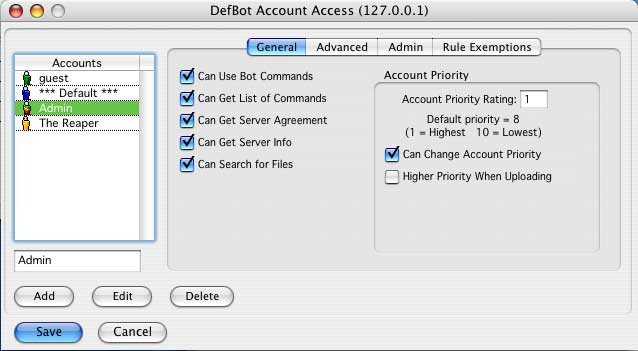
The DefBot allows users to use special messaging commands with different levels of access, or other special features of the bot, to allow users to access these functions the "DefBot Accounts" need to be setup for the accounts which will be accessing it.
To setup the DefBot accounts you need to open the "DefBot Accounts" window.
There are many options available for each account, we have preset the most used options to already be activated.
The level of access has been split into four panels, you can set whatever options you wish, however we do recommend taking care with some of them.
To start with you will need to setup some accounts for the access option, the usual ones will be "admin" and "guest", if you leave the account blank and click add it will create a "***Default***" account, which will be used for all accounts other than those listed, which is good for a general setup for members etc.
Lets setup the guest account first:
Type "guest" in the text box.
Click the "Add" button.
It has now created a guest account for DefBot access, this will be using the preset options that have been built into the bot.
Option |
Description |
Recommended Access Level |
| Can Use Bot Commands | Allows the account access to the messaging commands. | Any |
| Can Get List of Commands | Allows the account to retrieve a list of available commands. | Any |
| Can Get Server Agreement | Allows the account to use the command that asks for the server agreement to be displayed. | Any |
| Can Get Server Info | Allows the account to retrieve the server information. | Any |
| Can Search For Files | Allows the account to use the file search commands. | Members |
| Can Change Account Priority | Allows the account to change the priority of accounts for Download access | Admin |
| Account Priority Rating | This is the priority level of the account, the lower the number the more important the account. | - |
| Higher Priority When Uploading | This will increase the users level if they are uploading, this is done to help avoid them being kicked | Any |
Option |
Description |
Recommended Access Level |
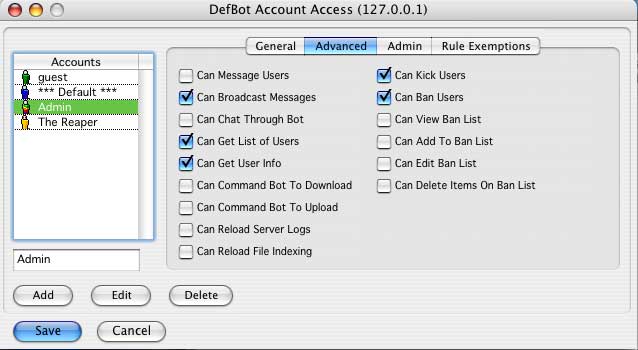
| Can Message Users | Allows the account to use the command to send messages to other users through the bot. | Members |
| Can Broadcast Messages | Allows the account to use the command to broadcast messages to other users through the bot. | Admin |
| Can Chat Through Bot | Allows the account to use the command to chat to other users through the bot. | Admin |
| Can Get List of Users | Allows the account to use the command to retrieve a list of users connected to the server. | Members |
| Can Get User Info | Allows the account to use the command to retrieve info on any user connected to the server. | Members |
| Can Command Bot to Download | Allows the account to control the bots file transfers remotely | Admin |
| Can Command Bot to Upload | Allows the account to control the bots file transfers remotely | Admin |
| Can Reload Server logs | Allows the account to reload the server logs remotely | Admin |
| Can Reload File Indexing | Allows the account to reload the file index remotely | Admin |
| Can Kick Users | Allows the account to use the command to disconnect users connected to the server. | Admin |
| Can Ban Users | Allows the account to use the command to ban users connected to the server. | Admin |
| Can View Ban List | Allows the account to use the command to view the list of banned users. | Admin |
| Can Add To Ban List | Allows the account to use the command to add users to the list of banned users. | Admin |
| Can Edit Ban List | Allows the account to use the command to edit the list of banned users. | Admin |
| Can Delete Items On Ban List | Allows the account to use the command to delete items from the list of banned users. | Admin |
Option |
Description |
Recommended Access Level |
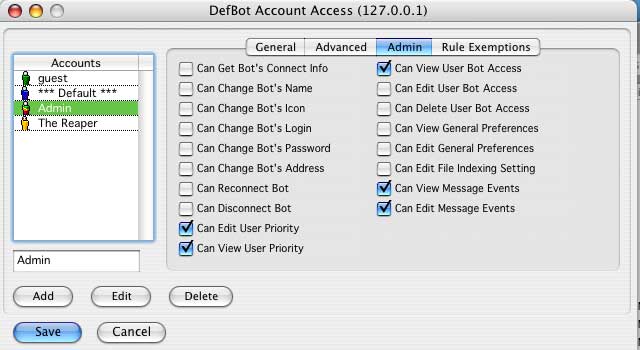
| Can Get Bot's Connect Info | Allows the account to use the command to retrieve the bot's connection info. | Admin |
| Can Change Bot's Name | Allows the account to use the command to change the name of the bot. | Admin |
| Can Change Bot's Icon | Allows the account to use the command to change the icon used by the bot. | Admin |
| Can Change Bot's Login | Allows the account to use the command to change the login used by the bot. | Admin |
| Can Change Bot's Password | Allows the account to use the command to change the password used by the bot. | Admin |
| Can Change Bot's Address | Allows the account to use the command to change the server address used by the bot. | Admin |
| Can Reconnect Bot | Allows the account to use the command to tell the bot to reconnect to the server. | Admin |
| Can Disconnect Bot | Allows the account to use the command to tell the bot to disconnect from the server. | Admin |
| Can Edit User Priority | Admin | |
| Can View User Priority | Admin | |
| Can View User Bot Access | Admin | |
| Can Edit User Bot Access | Admin | |
| Can Delete User Bot Access | Admin | |
| Can View General Preferences | Admin | |
| Can Edit File Indexing Setting | Admin | |
| Can View Message Events | Admin | |
| Can Edit Message Events | Admin | |
Rule Exemptions |
- | |
| Do Not Enforce Multiple Login Rule | Tells the bot to not enforce the multiple login rules for the account. | Admin |
| Do Not Enforce Upload Rule | Tells the bot to not enforce the upload rules for the account. | Members |
| Do Not Disconnect | Tells the bot to never disconnect users using the account. | Admin |
| Do Not Ban | Tells the bot to not ban any users using the account. | Members |
Option |
Description |
Recommended Access Level |
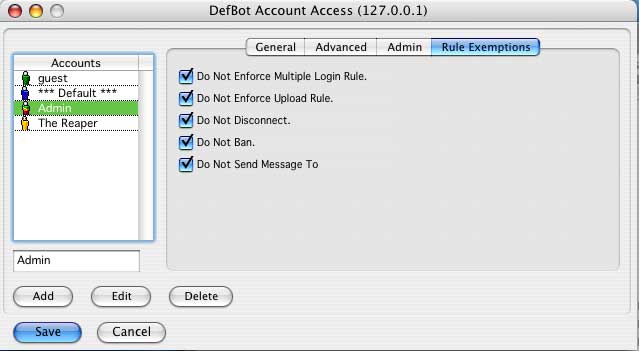
| Do Not Enforce Multiple Login Rule | Tells the bot to not enforce the multiple login rules for the account. | Admin |
| Do Not Enforce Upload Rule | Tells the bot to not enforce the upload rules for the account. | Members |
| Do Not Disconnect | Tells the bot to never disconnect users using the account. | Admin |
| Do Not Ban | Tells the bot to not ban any users using the account. | Members |
| Do Not Send Message To | Tells the bot to not message any users using this account | Admin |
Well, that is up to you, I recommend that you only use the preset options for the guest account, and use the ones shown in the images for the admin account, with something in between the two for account holders.
One important feature is the "Account Priority".
The priority level is important, if you allow download access without requiring uploads you can tell the bot to use the priority features, which means you can set a higher priority for account holders or admin, so if a guest is downloading (and not uploading) and an account holder wishes to download when there are no more slots left, the user with the lowest priority will be kicked until the account holder (or user with a higher priority) gets a download slot.
NOTE: If a user is uploading the bot will not kick them if the "Higher Priority When Uploading" option is selected.
This counter shows the number of hits since the 4th November 2003
Copyright © S&M Software 2004-2016